Overwhelmed at first, but already ahead of the curve
Sara booked this call after some honest, slightly overwhelmed feedback about xTiles — she had spent a week poking around on her own and figured out a little of it, but the surface area of the tool was a lot to take in at once. That is a common starting point, and it is worth naming before the rest of the story: feeling overwhelmed by xTiles at first is normal, not a sign you are using it wrong.
She was not looking to replace her planner outright. She uses a dedicated digital planner app, Artful Agenda, and genuinely likes it. The gap was more specific: her planner tracks events — if it is not in there, it does not get done — but it has never held her documents. Those live somewhere else entirely: "a million different documents and things that are hard to find sometimes," scattered across Google Docs and Google Sheets.
A planner app and a document pile solve different problems, and most people end up running both at once — one for what happens when, one for what was written down. Neither one talks to the other.
Sara's version of this was a planner for events, plus a growing, unsearchable stack of Docs and Sheets on the side. The fix was not choosing between them. It was finding one place that could hold both.
Spaces as folders, without one giant messy pile
The first idea Serhii walked through was xTiles' Spaces — personal by default, shareable if you ever need to collaborate. For someone trying to consolidate scattered documents, the comparison that landed was the simplest one: "you can use all of these spaces as Google Drive folders." A personal space, a travel space, a family space — each one separate, so that a season's worth of planning does not all pile into a single messy project.
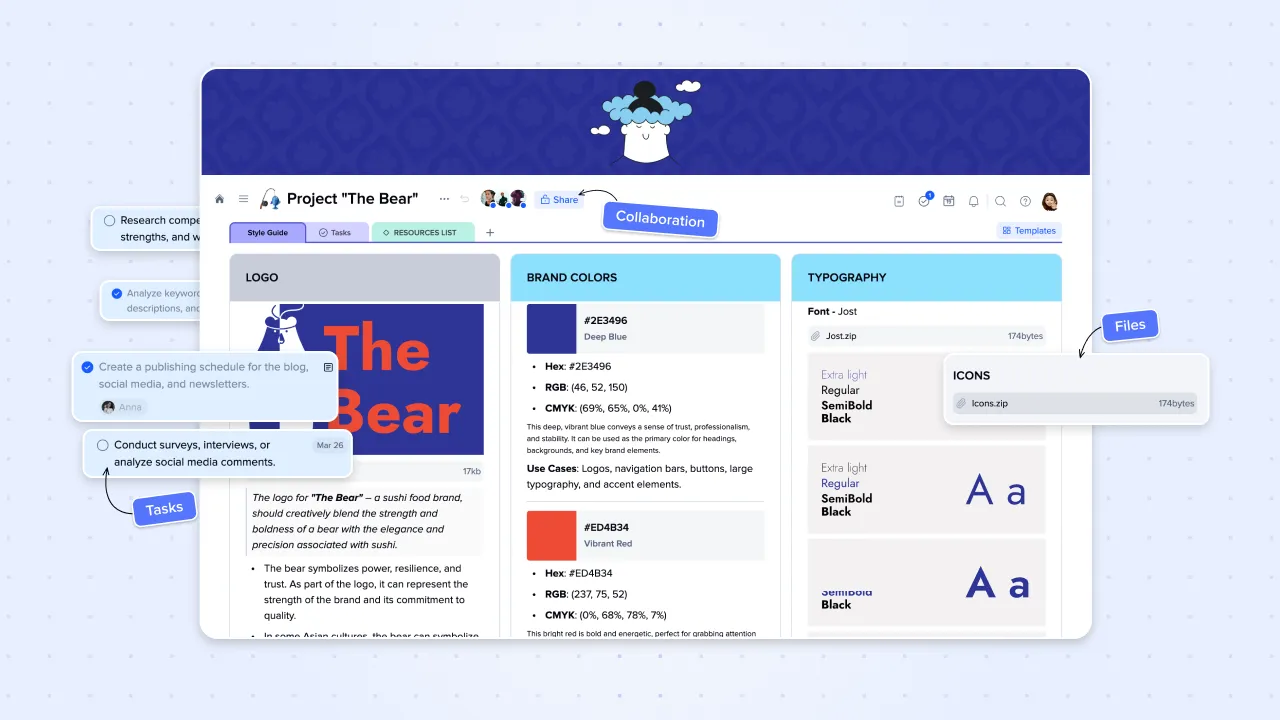
That single idea addressed her original complaint directly. Instead of documents living in one app and tasks living in another with no link between them, a Space can hold both — the plan and the paperwork behind it, in the same place.
Connecting tasks and events across spaces into one Planner
The second idea was how any task with a due date, in any Space or Project, automatically shows up in the Planner — so nothing needs to be remembered separately. In the demo, a task set for the end of the month appeared in the Planner without any extra step, alongside another task due the next day. Switch to the weekly view and both are visible together; drag a task to a different day and it simply moves.
Sara asked directly whether it syncs with Google Calendar — it does, and she had already connected hers. The daily view goes a step further than a synced calendar, though: it shows tasks, notes, and calendar events together on one page, so checking the day does not mean checking three separate apps.
Her own read on it, after seeing the checklist functionality specifically: her planner "does have a list area," but a basic one — nothing close to what a proper task list with due dates, movement between days, and a Planner rollup could do for tracking what actually got accomplished.
The real reason she was on the call: a migration she'd already pulled off
This is the detail that makes Sara's story different from a typical first walkthrough: by the time this call happened, she had already used AI inside xTiles to solve part of her own problem, unprompted. She had an accountability planner she'd built as a Google Sheet, and asked Claude to recreate that same format inside xTiles.
It worked well enough that she deleted the original. "I used AI to copy the format into xTiles, and I actually made one — the same thing as the spreadsheet, but it looks better in xTiles. I actually deleted that spreadsheet." She only booked this session because xTiles prompted her afterward, asking if she wanted to learn more AI-assisted ways to use the workspace — and she said yes.
A lot of onboarding calls start from zero. This one started from a user who had already solved a real problem on her own, with AI, in a single sitting — before anyone showed her how.
That is the shape of the gap most spreadsheet-based planners have: the format is fine, but a spreadsheet cannot connect to a Planner, a calendar, or a Library the way a native xTiles page can.
From meal plans to a scheduled morning brief
From there, Serhii showed a few more AI-assisted patterns rather than sending Sara into the template gallery to browse alone — something she had already found overwhelming. Asking for "a weekly meal planner for a vegan family of two" produced a full week of breakfast, lunch, and dinner tiles plus a shopping list, and a follow-up request turned that into a grocery task with a due date — all without touching a template.
The other pattern was connecting Claude to xTiles via MCP for a scheduled morning brief: Claude reviews an inbox, Slack, and xTiles tasks each morning, then writes three tiles into the daily Planner page — one for emails that need attention, one for Slack, one for tasks, including moving overdue items from yesterday into today automatically.
A second version of the same idea handles newsletters specifically: Claude summarizes each one into its own tile — key topic, a short summary, a link back to the source — and archives the original email, so a cluttered inbox does not have to be reviewed newsletter by newsletter.
Pasting links into a searchable Library instead of scattered Docs
The last piece closed the loop on Sara's original complaint most directly. Any link — an article, a video, anything — can be pasted straight into a daily page, or saved through the Web Clipper browser extension. Either way, it also lands automatically in the Library: every link, file, image, and PDF ever saved, organized by media type and browsable without digging back through old daily pages.
That is the direct answer to "a million different documents that are hard to find sometimes" — instead of hunting across weeks of Google Docs, everything saved lands in one searchable place, viewable as a gallery, a kanban board, or however else fits how you think.
Sara's closing reaction summed up the session better than any feature list could: "This was helpful. Yeah. This was really helpful." She had already been experimenting on her own — a daily cleaning schedule built from a template, tasks pulled into her calendar — and the call filled in the connective pieces she had not found yet.