One person, three careers
When NIA joined a demo call to explore xTiles, she answered the question "what do you do?" with a list: registered massage therapist, singer-rapper, and co-owner of a wellness company with four other people. She paused. "I will give you a little bit long answer because I'm not as straightforward."
Not straightforward is one way to put it. Three careers means three separate contexts — each with its own clients, projects, creative work, and administrative overhead. A massage practice runs on appointments, session notes, and client follow-ups. A music career runs on tracks, releases, collaborations, and promotion. A wellness company involves co-founder coordination, product or service management, and shared goals across a team of five.
Most productivity tools are built for one of these, not all three. You can use a booking system for clients, a notes app for lyrics, a project manager for the company. But every additional tool is another place your attention has to go — and every switch costs something.
The ADHD tax on tool-switching
NIA has ADHD. This changes the calculus significantly. She described the specific failure mode clearly: too many clicks, too much loading time, too much navigation — and the tool stops being used.
For people without ADHD, friction is annoying. For people with ADHD, friction is fatal. The working memory load required to open an app, navigate to the right section, and remember what you were going to do there is exactly what ADHD disrupts. If the tool doesn't meet you where you are — immediately, visually, without demanding navigation — it doesn't get used.
She came in with two requirements: things split into separate categories (work, personal, the different career tracks), and immediate access with minimal clicks. The second requirement is not a nice-to-have. It is the condition under which the first requirement becomes useful at all.
A perfectly organized system you never open is not a productivity tool. It is a monument to good intentions.
This is why NIA had evaluated and discarded tools before. Not because they lacked features — but because the friction between her and the information was too high.
Spaces that map to how your life is actually divided
xTiles is built on a three-level hierarchy: Spaces, Projects, and Pages. For someone like NIA, the Spaces level is where the separation she asked for lives — one Space for the massage practice, one for music, one for the wellness company.
Spaces work like top-level folders. They stay separate by default. Work from the wellness company does not mix with session notes from the practice. Song drafts do not appear alongside co-founder meeting agendas. Each area of life has its own container.
- Music Space — song projects, release tracking, collaborations, creative notes, lyrics drafts
- Practice Space — client project pages, session notes, appointment prep, professional references
- Wellness Company Space — shared goals with co-founders, product tracking, meeting notes, company roadmap
- Personal Space — life admin, books, personal goals, anything that does not belong to a specific career track
The depth goes further. Each Space contains Projects, and each Project contains Pages. A music release can become its own Project with pages for the track itself, the promotion plan, the visual assets, and the timeline. A client at the practice can have a Project with pages for session history and follow-up notes. The structure scales to however much complexity each career track actually generates — without imposing that structure on areas that don't need it.
My Planner: one screen for everything that matters today
The Spaces structure handles the big-picture organization. But for day-to-day use, the entry point is different. My Planner is where NIA would actually start her day — not in her Music Space or her Practice Space, but in a single view that pulls everything together.
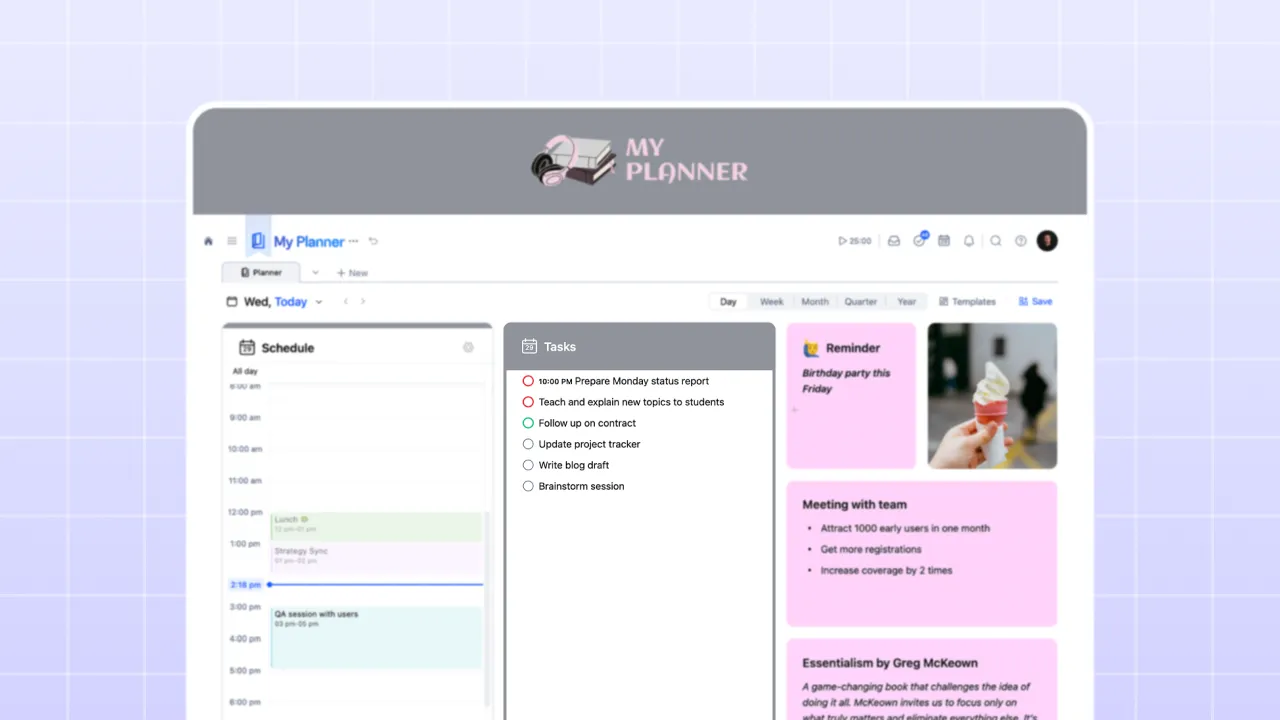
The daily Planner brings three things together on one screen: a schedule pulled from your connected calendar (Google or Outlook), all tasks with a due date for that day from every Space and Project in your workspace, and tiles you have added for notes, links, reminders, or anything else you want in front of you.
For NIA, this solves the switching problem directly. She does not need to open the Practice Space to see what appointments are coming up. She does not need to check the wellness company project to see what tasks are due. Everything that matters today is already there — and it loads immediately.
The weekly Planner view adds another layer: all tasks laid out by day across the week. If the day is overloaded, you can drag tasks to tomorrow or the day after. The visual layout of the week makes it obvious when you are trying to fit too much into a single day — something a list can never show you.
Why the visual layer changes everything for ADHD
NIA made the connection herself during the demo: the part she found most interesting was what xTiles does for ADHD specifically. Not the features — the format. A list of tasks requires you to scan it, hold its contents in working memory, and process them sequentially. A visual canvas presents information spatially. You see it, not just read it.
In xTiles, every page is a tile-based canvas that fills the full screen width. A massage practice page might have a section for this week's appointments next to a section for follow-up notes, with a habit tracker tile in the corner. A music project page might have the track list beside a content calendar beside a mood board of references. The information is arranged the way your brain holds it — by proximity and relationship, not by the order it was typed.
This spatial organization is not cosmetic. For visual thinkers — and particularly for people with ADHD — it reduces the cognitive load required to stay oriented inside a project. You do not need to remember where everything is. You can see where everything is.
Databases without the learning curve
During the demo, NIA asked about organizing information across different categories — the kind of question that leads most tools to suggest spreadsheets or complex databases. In xTiles, this is handled through Collections.
A Collection is a database you can view in multiple ways without duplicating the data. Create it once as a table, then switch to a gallery view, a kanban board, a calendar, or a timeline — all showing the same information, just arranged differently.
- Client roster — table with client names, last session date, notes, follow-up due. Switch to board view to see clients by status: active, on pause, needs follow-up.
- Song catalog — gallery view for a visual overview. Switch to table to sort by release status, collaborators, or completion stage.
- Wellness company tasks — kanban board grouped by team member or project phase. Move cards as work progresses.
- Books and resources — gallery with covers, tags for category, personal rating. Filter to see only unread items or items in a specific genre.
The key difference from a spreadsheet is that you never have to build the alternative views from scratch. Add the data once; let the Collection show it however is most useful in the moment.