The ADHD tools trap: a second brain you keep forgetting about
Paul is an electrical engineer. A few months before we spoke, he was diagnosed with inattentive ADHD — the subtype that does not announce itself with hyperactivity, but shows up in exactly the kind of friction he had been experiencing for years: information that will not stay in his head, systems that work for a while and then quietly stop.
He had been using Evernote on and off for years, more consistently in the last year or two. He had also tried Microsoft OneNote. Both served the same purpose: somewhere to put information so his brain did not have to hold it. A second brain, in the classic sense.
The pattern was always the same. "Applications never seem to stick. Forget I've got them." He would go through spells of active use — a good run at work, a week of solid organization — and then, after a holiday or a smooth stretch, the habit would drop. It could be weeks or months before he picked the tool back up.
Inattentive ADHD affects working memory, which means out of sight is genuinely out of mind. If a tool does not pull you back in, it disappears — not because you decided to stop using it, but because the mental cue to open it was never reliable to begin with.
This is why Paul kept returning to notes apps. Not because any of them solved the problem, but because the need kept returning, and a filing system was the obvious answer.
What Evernote gets right — and where it fails inattentive ADHD users
Evernote is a competent notes application. The capture system works. The search is reliable. The web clipper does what it promises. For users who need to store a lot of text and find it again later, Evernote is a reasonable choice.
The problem is not what Evernote stores. It is how little Evernote does to surface information back to you.
- Navigation-heavy structure. Evernote's model is hierarchical: Notebooks contain Notes. To get to something, you navigate there. The information exists when you look for it — but the tool offers almost no help making you remember to look.
- No daily planning view. There is no built-in place where your tasks from across all your notes consolidate into a picture of today. If you want to use Evernote as a task manager, you build and maintain that view yourself.
- Linear note format. Every note is a document — top to bottom. You cannot put a habit tracker beside a to-do list beside a journal entry and see all three at once. Spatial arrangement is not possible.
- Desktop-first origins. Evernote's strongest experience lives on desktop. It has mobile apps and a widget, but the overall product was built around a large-screen, folder-navigation model.
OneNote compounds this in its own way. The organizational flexibility — sections, section groups, nested notebooks — means there is always a more correct place to put something, which creates decision overhead. For inattentive ADHD, decision overhead is exactly what causes abandonment. Every extra choice between you and the action is a place where the habit breaks.
Why mobile-first design changes the calculus for ADHD
Paul cannot install applications on his work computer. This is common in technical and regulated industries. The result is that his primary interface with any productivity tool is his phone — not as a companion to a desktop setup, but as the main device for input, review, and capture. The couch use case reinforces this: late in the evening, watching television, a thought surfaces. He is not opening a laptop.
Both Evernote and xTiles offer Android home screen widgets for quick capture — one tap from your home screen to add a note or task before the thought disappears. For ADHD users, that shortcut matters: the moment between wanting to record something and having a field ready to type into is exactly where captures get lost.
Where the two tools diverge is what happens after the capture. In Evernote, a quick note lands in a notebook and waits to be found. In xTiles, a captured item connects to a system that surfaces it back to you — through My Planner on its due date, or through the Captured tile in your daily view if you clipped it from the web. The capture is not the end of the workflow; it is the beginning.
When Paul opens xTiles, his journal is spatially present — the layout he set up is visible, not buried behind a folder structure. He is not navigating to information; he is arriving at a canvas that was already arranged and waiting.
Visual canvas vs. notebook hierarchy: why the format matters
Evernote's mental model is the filing cabinet. You create a Notebook, put Notes inside it, and retrieve them when you need them. The system works for the purpose it was designed for: storing text you will want to find again.
xTiles works from a different premise. A page is a spatial canvas. Tiles — text, tasks, images, links, databases — are arranged on it, and the arrangement itself carries meaning. A daily journal page might have a mood tracker beside a gratitude section beside a task block. A work notes page might have meeting notes next to an open questions list. The relationships are visible because the items are physically adjacent, not because they are linked by text reference.
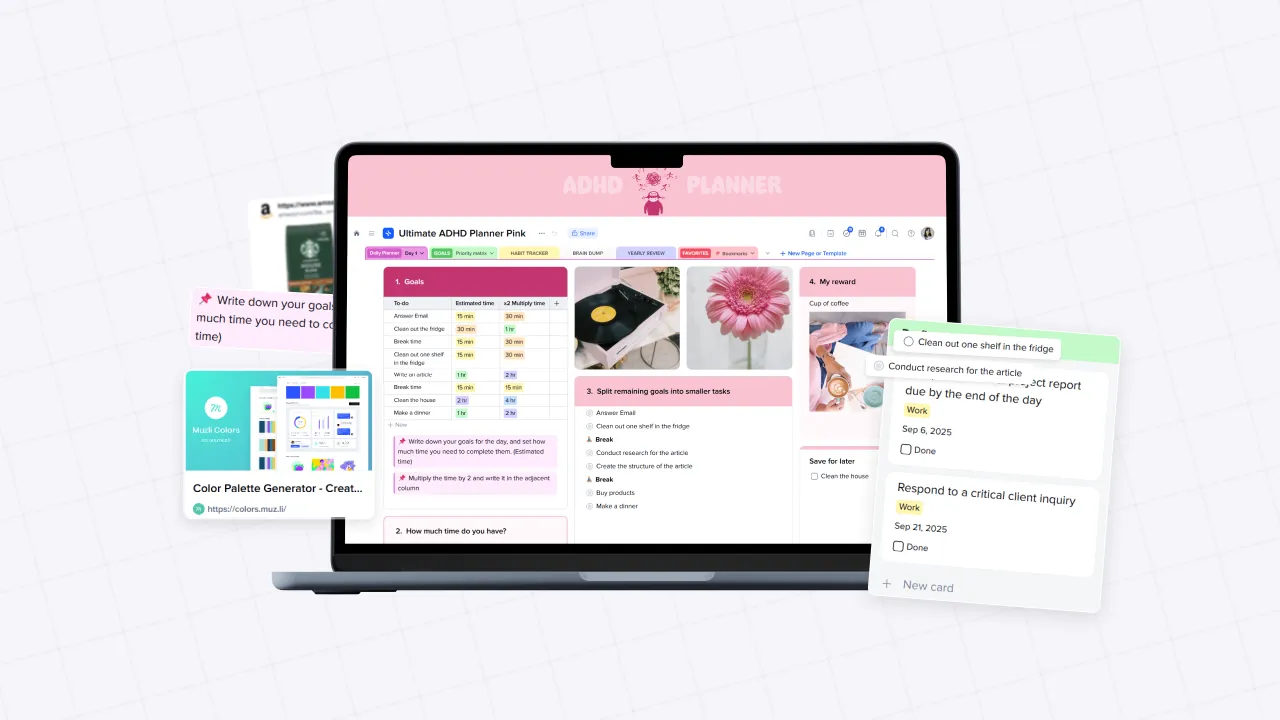
For inattentive ADHD, this is not an aesthetic difference. Working memory difficulty means that maintaining the context of a project — what you were doing, where you left off, what the next step is — is one of the hardest parts of the day. A visual layout externalizes that context. You see the state of the project rather than reconstructing it from a list of note titles.
Paul started with journaling because it was low-pressure and immediately useful. Even a journal in xTiles works differently than an Evernote note: sections can sit beside each other spatially, the page can be structured to match his actual habits rather than conforming to a linear document, and the same layout appears every day without reconstruction.
My Planner: the feature Evernote never built
Paul mentioned during the call that he was not sure what My Planner was. He is not alone — the name is not self-explanatory. But it is the feature that makes xTiles structurally different from Evernote for daily use.
My Planner is xTiles' built-in planning hub — a daily and weekly view that automatically pulls all tasks with due dates from every project in your workspace, alongside your connected calendar events. You do not build it. You do not configure filters. It is there by default, and it updates as tasks are created anywhere in the system.
- Daily view: All tasks due today, pulled from every Space and Project automatically, beside your calendar events. Notes, reminders, and journal tiles can sit alongside them on the same canvas.
- Weekly view: All tasks laid out by day across the week. If Monday has twelve tasks and Thursday has none, the weekly view makes that obvious before Monday arrives. You drag tasks between days to balance the load.
- No manual consolidation: A task created in any project — work notes, a journaling page, a personal project — surfaces in My Planner on its due date without any extra steps from you.
Evernote has reminders and a relatively recent tasks feature. But there is no view that consolidates your work into a planning layout automatically. If you use Evernote to track tasks, you maintain a consolidated view manually — which is exactly the kind of ongoing upkeep that causes inattentive ADHD users to drift away from a system.
For Paul, the path forward is gradual: start with journaling, learn the structure, then add work notes and tasks. The Planner becomes more valuable as more of his work enters the system. Once tasks have due dates, they appear in the daily view automatically — and that daily view becomes the hook that keeps him connected to the tool even through the good weeks when nothing feels urgent.