The gap task management apps cannot close
Most people who try xTiles already use a task management app. Todoist, Things, TickTick — these tools are good at what they do. They capture tasks, let you set due dates, and show you what needs to happen today or this week.
But there is a gap that task apps consistently fail to fill. Marcello, a power user who has evaluated dozens of productivity tools, put it clearly: "To-do lists may well cover for something that is for a day or two, a week. But usually, the struggle is how do you keep long-running projects going?"
This is the core problem. A task manager is optimized for immediacy — what to do today, what's overdue, what's coming up. It tells you nothing about the state of a project you've been running for three months, the status of something your team is working on in parallel, or how your priorities connect to each other across different areas of your life.
The issue is not that task apps are bad. It is that they are designed to answer a narrow question: what should I do next? They are not designed to answer the broader one: where does everything stand right now?
The difference between a dashboard and a to-do list
Marcello draws a distinction that most productivity tools ignore: a planner looks forward, a dashboard shows the current state. "The planner is sort of looking forward, but the dashboard is the current state and current state of your project activities that are happening within it."
A task list is a planner in the narrowest sense — it shows what is scheduled. A dashboard is something different. It shows what is active, what is in progress, what is blocked, and what you have been neglecting. It connects the dots between your tasks and the projects they belong to.
This is not a philosophical distinction. It has real consequences for how you work. If you only ever look at a task list, you lose track of context. Individual tasks get done, but the bigger picture — the project, the goal, the initiative — becomes invisible until a deadline forces you to look at it.
People who think visually tend to need spatial context to stay oriented. A list of 30 tasks does not give them that — it gives them 30 lines. They need to see how things relate, what is grouped together, and how their week connects to their projects.
Task apps are optimized for sequential processing. Visual thinkers need a canvas, not a queue.
xTiles vs Todoist: what each tool is actually built for
Todoist is purpose-built for task capture and execution. It does that extremely well. xTiles is built for something different: a visual workspace where your tasks, projects, references, and planning all live together.
- Task capture — Todoist wins here. Quick capture via natural language, keyboard shortcuts, and integrations with email and calendar. xTiles can capture tasks anywhere, but the experience is more spatial than rapid-fire.
- Project visibility — xTiles wins. Each project is a visual canvas you can arrange spatially. In Todoist, projects are nested lists with no spatial context — you cannot see the shape of your work at a glance.
- Long-running work — xTiles wins. Tasks and project pages live together in the same workspace. You do not lose context when you return to something after two weeks.
- Visual information — xTiles only. Todoist has no concept of spatial arrangement or visual layouts. xTiles handles documents, images, links, and tasks in one tile-based canvas.
- Daily and weekly planning — xTiles wins with My Planner. It auto-aggregates tasks from every project in your workspace into one view, with calendar integration and customizable templates. Todoist's today view shows tasks; xTiles Planner shows tasks in the context of your whole workspace.
- Active development — xTiles ships regular updates across mobile and desktop. Todoist is mature and stable, but its core model has not changed significantly in years.
My Planner: the hub that task apps cannot replicate
Marcello's most pointed observation was about My Planner: "It knows what information to grab from within your xTiles account and pipe that into that page. That I think is a power user kind of feature."
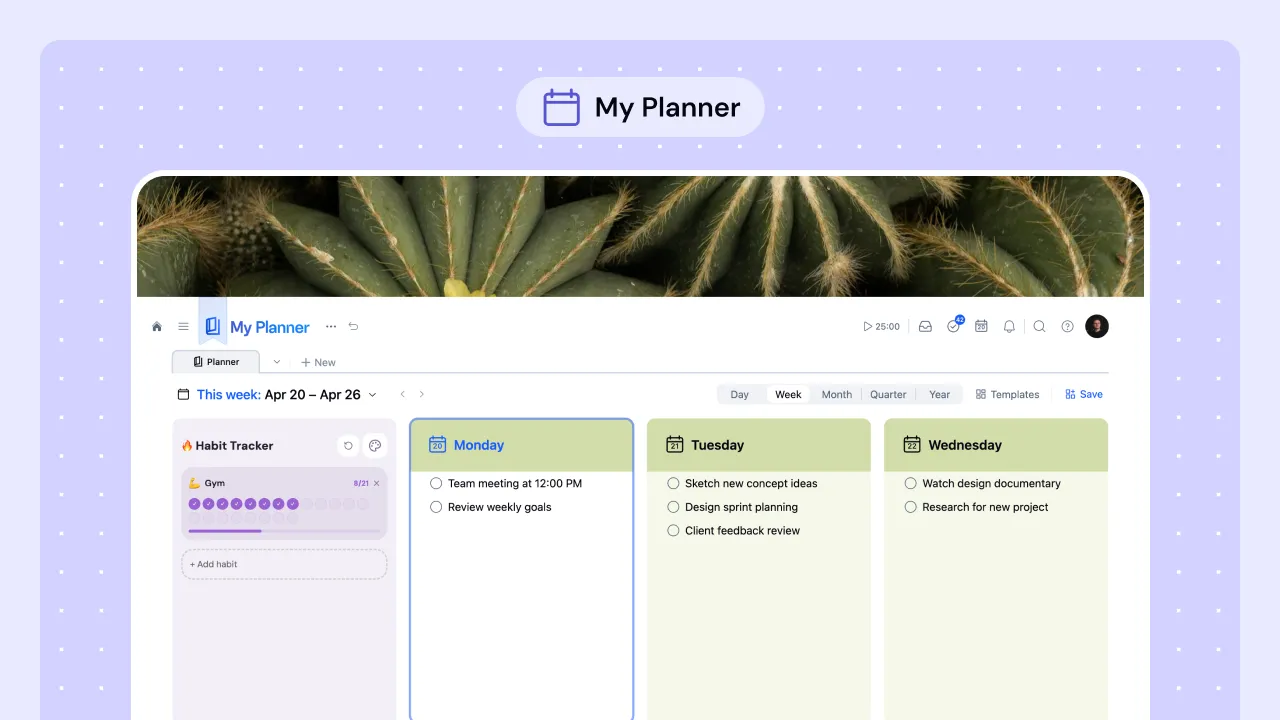
My Planner is not a task list. It is a view that pulls together everything happening across your workspace — tasks with due dates from every project, calendar events from Google or Outlook, recently visited projects, and saved web content from the Web Clipper — into one visual layout. You do not configure what appears. The relevant information surfaces automatically.
In Todoist, your today view shows you your tasks for today. In xTiles, your Planner shows you your tasks for today in the context of your projects, your schedule, and what you have been working on. The difference is not cosmetic — it changes what decisions you can make from a single screen.
The visual layer task apps are missing
Marcello described xTiles as "very moldable" — a word that comes up repeatedly among power users. It points to something task apps structurally cannot offer: the ability to make the tool look and behave like your mental model rather than forcing your mental model into the tool's structure.
In Todoist, you work inside Todoist's UI. You can nest projects, add labels, and color-code tasks — but the structure is always Todoist's structure. In xTiles, you work inside a canvas. You arrange tiles the way your brain arranges information: a weekly plan next to your active projects, a habit tracker beside your daily tasks, a research area connected to the project it feeds.
This matters especially for visual information. Todoist can attach a file to a task. xTiles can build an entire project page around images, links, notes, and tasks — spatially arranged, with no hierarchy forcing you to scroll through a document to find anything. As Marcello put it, task apps "are not good with visual information. And I think that's where xTiles really differentiates itself."
When to use xTiles instead of — or alongside — a task app
Marcello does not see this as a binary choice. He has used multiple productivity tools in parallel and found each has a different role. For teams working in environments where corporate tooling is mandated, xTiles can sit alongside those tools — handling the visual and project layer while the official tool handles structured records.
For individuals, the question is simpler. If your current tool gives you a task list but loses track of your projects, xTiles is worth trying as a primary workspace. If you find yourself maintaining a separate document for project context, or switching between several apps to understand where things stand, the problem is not your discipline — it is the tool's model.
Task apps answer: what should I do next? xTiles answers: where does everything stand? For anyone doing complex, multi-threaded work, both questions need to be answered in the same place.