The career path that led here
Kat spent years as a software engineer. She was deep in code, understood how systems worked, and navigated technical environments that most people find opaque. Then she pivoted — not away from tech, but toward the people who struggle inside it.
She became an ADHD coach. Not for any audience, but specifically for tech people: developers, engineers, and other technically fluent professionals who have ADHD and are trying to manage their work and lives with it. Her positioning is exact: "Helping tech people — mostly tech-savvy people — with ADHD. With their problems in their life or in work."
That background matters. A lot of ADHD coaching advice lands differently when it comes from someone who has never opened a terminal. Kat's clients know she's been inside the same systems they're working in. She understands the stack. She can translate.
Why visual tools matter for ADHD brains
One of the recurring challenges for people with ADHD is working memory — the ability to hold multiple things in mind at once and act on them without losing track. When your working memory drops something, it often just disappears. The thought was there; now it is not.
Visual tools do something text-based lists can't: they offload. When information is visible on a canvas — arranged spatially, color-coded, grouped — your brain doesn't have to hold it all internally. It can see it. This is why whiteboard-style tools and visual planners tend to resonate so strongly with ADHD users.
Kat had used Obsidian before finding xTiles. She knew the value of capturing and connecting information. But Obsidian's text-first interface kept creating friction. "I've been wanting to use xTiles more because [Obsidian is] not visual." That shift — from text structure to visual space — changed how she worked.
About half of xTiles users have ADHD or suspect they do. That's not an accident — the tile-based visual layout was designed around the idea that thinking spatially should be as easy as thinking in lists.
For people who bounce between apps, lose their notes, or find document-style tools overwhelming, xTiles offers a canvas that stays visible without demanding constant re-navigation.
How Kat uses xTiles herself
Kat uses xTiles as her visual layer — the place where information becomes visible and plannable rather than buried in text. She's also an active user of Claude Code and MCP integrations, which means she thinks about xTiles not just as a workspace but as a system that can connect to other tools.
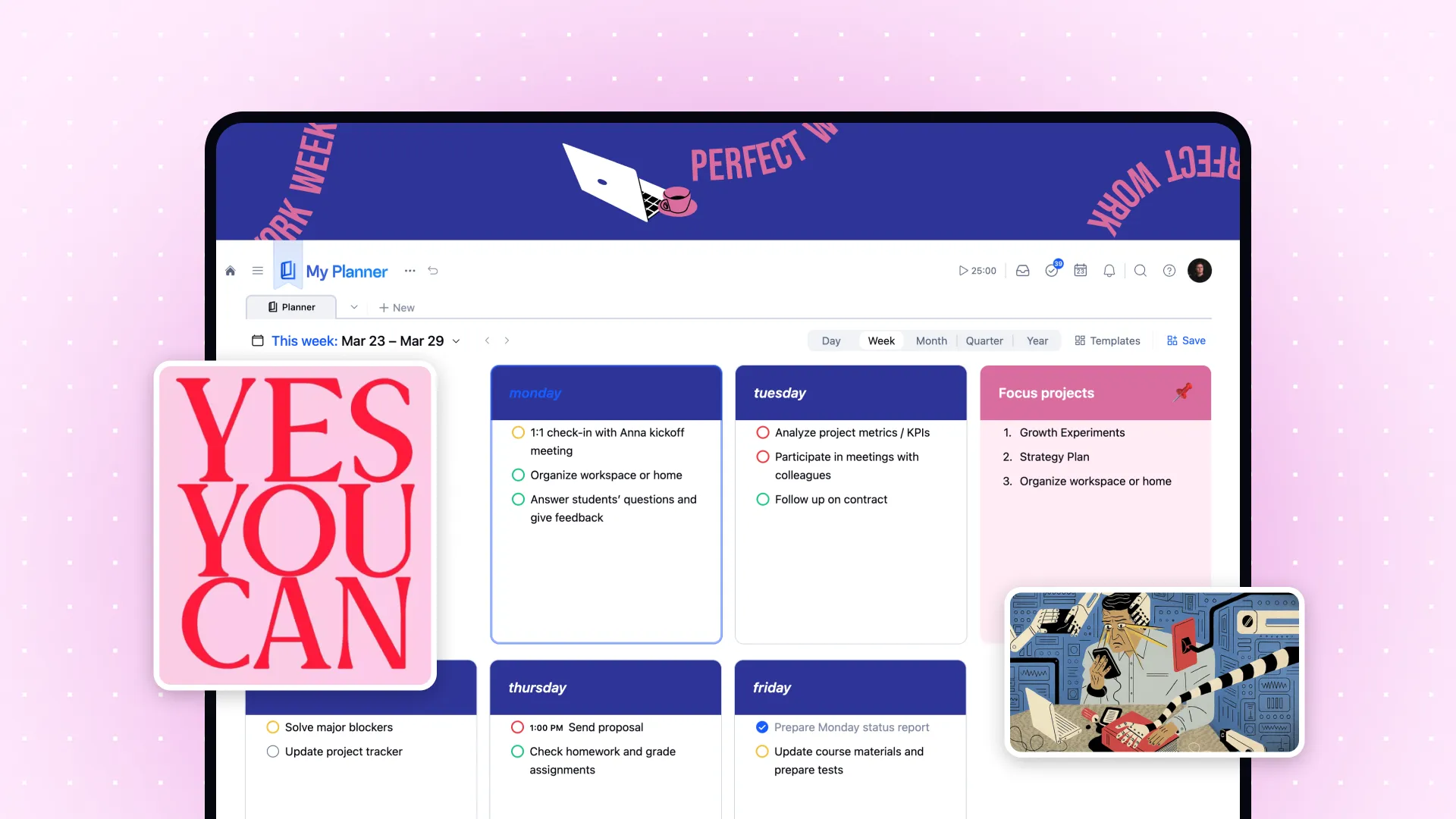
The weekly Planner view is where day-to-day planning lives. Tasks from different projects surface by date, giving a single view of what's ahead without requiring navigation between different places. For an ADHD brain that loses track of time and upcoming commitments, this kind of unified calendar-plus-tasks view reduces the friction of having to look in multiple places.
She also uses xTiles for projects that don't fit into a to-do list format: thinking through client cases, capturing reference material, mapping out ideas visually. The tile canvas handles these in a way that linear notes apps don't.
The integration she had been waiting for
Kat had been experimenting with MCP integrations across different tools before xTiles added its own. When xTiles launched MCP support, her reaction was immediate: "I've almost been waiting for an MCP integration."
The xTiles + Claude MCP integration works in both directions. In one direction, Claude can read from connected tools — Gmail, calendar, Slack — and write structured tiles directly into xTiles. Morning digests, newsletter summaries, task lists extracted from email threads: all of it can land in the Planner automatically.
In the other direction, xTiles projects can serve as context for Claude. A client project, a set of session notes, a planning page — Claude can read these and use them as the basis for analysis, summaries, or follow-up prompts. For someone running a coaching practice, this makes xTiles a working knowledge base that Claude can actually engage with.
For coaches in particular, this opens up workflows that previously required manual effort: synthesizing patterns across client sessions, drafting follow-up resources, or pulling weekly priorities from a planning page into a daily brief. All of it stays in one visual space.
Why this matters for her clients
Kat's clients are tech-savvy. They've often tried many productivity systems. They've built elaborate Notion databases that they stopped using, or Obsidian vaults that became too complex to navigate. They understand the tools — but understanding a tool and actually using it are different things for an ADHD brain.
What Kat brings is a combination of tech literacy and lived experience with the same challenges her clients face. When she recommends a tool, she can explain not just what it does, but why it works differently for an ADHD brain — and how to set it up in a way that reduces friction rather than adding it.
She's not trying to make her clients dependent on any single tool. She uses multiple things herself and is transparent about that. "I bounce around using a lot of different products." What matters is finding the right tool for the right use — and for visual thinking, planning, and keeping context alive across sessions, xTiles fits.