The student productivity trap: six apps, zero clarity
Most students end up with the same problem: assignments live in Blackboard or Canvas, deadlines in a phone calendar, notes in Notion, and to-dos in a separate app. Every time you need to know what to work on next, you're switching between three or four systems.
Luc recognized this pattern in his own workflow. His brain, as he puts it, gets easily distracted when information is scattered. Checking different places for different things doesn't just waste time — it breaks focus.
His solution wasn't to find a better to-do app. It was to pull everything into one visual system where his daily tasks, journal, notes, and priorities all exist in the same place. That system is xTiles, and the core of how he prioritizes inside it is the Eisenhower Matrix.
What the Eisenhower Matrix is — and why it's built into xTiles
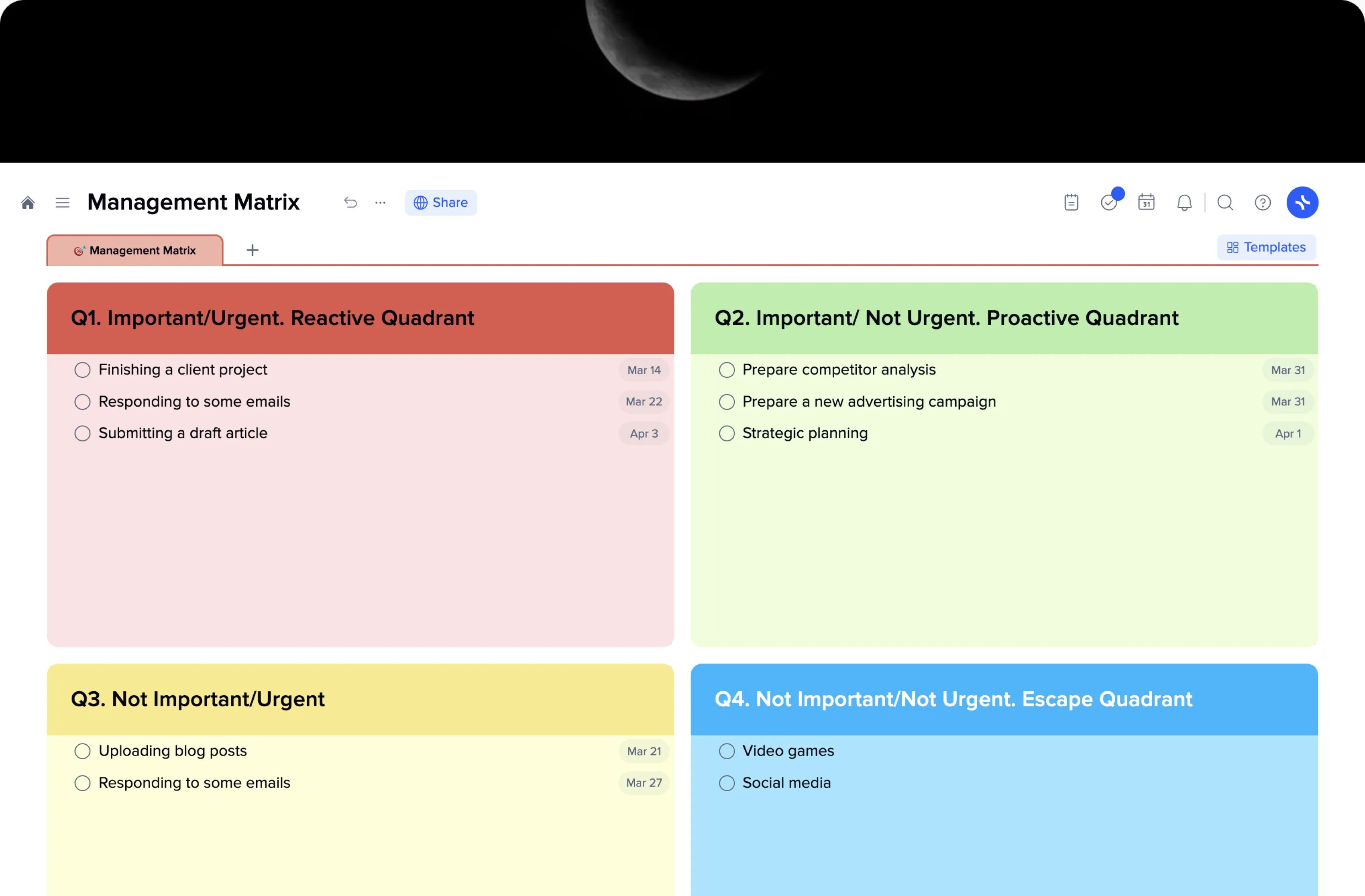
The Eisenhower Matrix is a decision-making framework that sorts tasks into four quadrants based on two dimensions: urgency and importance. It was popularized by President Dwight Eisenhower, who managed an enormous workload by asking one question about every task: is this urgent, and is it important?
Q1 — Urgent + Important: Do immediately. Exam tomorrow, deadline today, broken code that's blocking submission.
Q2 — Important, Not Urgent: Schedule. Studying ahead, side projects, long-term personal goals.
Q3 — Urgent, Not Important: Delegate or defer. Group chat replies, low-stakes requests that aren't your priority.
Q4 — Not Urgent, Not Important: Eliminate. Mindless browsing, low-value distractions dressed up as productivity.
The matrix is built into xTiles as an Eisenhower Matrix template you can drop into any project or daily page. Luc describes the moment he found it: "There's kind of the Eisenhower. And that's really nice that that's built in. I think that really helps me kind of orient my tasks — figure out the things that I want to do first, what I delegate."
For students, the biggest trap is treating everything as Q1 — everything feels urgent because everything has a deadline. The matrix forces you to slow down for thirty seconds and ask whether each task actually needs to happen today, or whether it just feels that way.
Planning across daily, weekly, monthly, and yearly in one place
Beyond the Eisenhower Matrix, the feature that stuck out most for Luc was the planner's time horizons. xTiles Planner gives you a day view, a week view, a month view, a quarterly view, and a yearly view — all navigable from one place.
"I've never seen anything like that before. So I think that's very creative. To kind of have your daily, your weekly, your monthly, your quarterly, and your yearly — have all of that." Luc
For a student balancing coursework with personal goals and longer-term ambitions, this structure maps naturally onto how life actually works:
- Daily — today's assignments, class prep, and reminders with due times
- Weekly — which courses need the most attention this week, study blocks to protect
- Monthly — upcoming exams, project milestones, anything that needs to be on your radar now
- Quarterly — semester goals, internship applications, research timelines
- Yearly — degree milestones, personal resolutions, skill goals beyond the curriculum
Tasks created anywhere in xTiles — inside a class project, a personal goal, or a quick note — automatically appear in the planner on their due date. You don't have to manually transfer anything between views.
Luc's daily setup: tasks, journal, and notes in one page
On any given day, Luc's xTiles setup has three layers running in parallel: tasks with due dates, a daily journal for capturing whatever's on his mind, and a permanent notes tab for things he wants to keep but doesn't need to revisit every day.
Set up your daily page with the Eisenhower Matrix
Open your day view in xTiles Planner and add the Eisenhower Matrix template. This gives you four labeled sections. As tasks come in — from class, from your head, from email — drop each one into the right quadrant before doing anything else.
Add tasks with due dates and optional links
For each Q1 or Q2 task, create a task with a due date. You can paste a link directly into the task — a Blackboard assignment URL, a Google Doc, a reading — so everything you need to complete the task is one click away.
Keep a daily journal tile for quick capture
Below your task quadrants, keep a journal tile. When thoughts come up during the day — ideas, frustrations, random connections — write them here instead of losing them or opening a new app. This is your brain dump, not a to-do list.
Use a permanent notes tab for reference material
Create a separate tab (not your daily page) for notes you want to keep long-term: course summaries, useful formulas, reference links. This keeps your daily view clean while making knowledge findable when you need it.
Why xTiles works for daily flow where Notion doesn't
Luc uses both xTiles and Notion — but for different things. Notion, he says, is "a lot less intuitive." Setting up a new daily page, rearranging content, adding different media types — in Notion this requires understanding its block system and database structure. In xTiles, it's drag-and-drop.
"You can resize the tiles. You can basically put any sort of thing you want in there — image, text, video. And so that process is a lot quicker." Luc
For a student who needs to quickly capture what's happening right now — a task before it slips away, a journal entry before the feeling passes, a note from a lecture — friction is the enemy. xTiles wins on daily capture speed.